Click to play
x
Controls

Controls

Go back, close menu, open game menu

  • Keyboard - [ Esc / X / Numpad - ]
  • Gamepad - [ Cancel (East) ]

Click or press menu buttons

  • Keyboard - [ Submit (Enter) / Space ]
  • Gamepad - [ Submit (South) ]

Navigate menu buttons or sudoku board

  • Keyboard - [ WASD / Arrow keys ]
  • Gamepad - [ D-pad / Any stick ]

Switch focus between menu buttons and sudoku board

  • Keyboard - [ Ctrl / K / Numpad (/) ]
  • Gamepad - [ West / Select / Left shoulder]

Toggle pencil or note

  • Keyboard - [ Tab / N / Numpad + ]
  • Gamepad - [ North / Right shoulder ]

Input/note number in cell

  • Keyboard - [ Number or Numpad keys 123456789 ]

Erase/empty cell

  • Keyboard - [ Number or Numpad key 0 / Backspace ]

Pause game

  • Keyboard - [ ` / P / Numpad * ]
  • Gamepad - [ Start ]

Fullscreen / window mode

  • Keyboard - [ F11 ]
Shaolin Sudoku

Shaolin Sudoku

Shaolin Sudoku
Click to play
This game is not available on mobile.
rotate phone

Shaolin Sudoku

Instructions

Controls

Go back, close menu, open game menu

  • Keyboard - [ Esc / X / Numpad - ]
  • Gamepad - [ Cancel (East) ]

Click or press menu buttons

  • Keyboard - [ Submit (Enter) / Space ]
  • Gamepad - [ Submit (South) ]

Navigate menu buttons or sudoku board

  • Keyboard - [ WASD / Arrow keys ]
  • Gamepad - [ D-pad / Any stick ]

Switch focus between menu buttons and sudoku board

  • Keyboard - [ Ctrl / K / Numpad (/) ]
  • Gamepad - [ West / Select / Left shoulder]

Toggle pencil or note

  • Keyboard - [ Tab / N / Numpad + ]
  • Gamepad - [ North / Right shoulder ]

Input/note number in cell

  • Keyboard - [ Number or Numpad keys 123456789 ]

Erase/empty cell

  • Keyboard - [ Number or Numpad key 0 / Backspace ]

Pause game

  • Keyboard - [ ` / P / Numpad * ]
  • Gamepad - [ Start ]

Fullscreen / window mode

  • Keyboard - [ F11 ]

Description

Shaolin Sudoku – Puzzle Mastery Meets Zen Simplicity

Shaolin Sudoku blends classic Sudoku logic with a sleek 2D aesthetic that hooks you from the first tap. One‑player focus means you set your own pace, carving out quiet moments of concentration. Solve grids, beat the error limit, and feel the rush of a perfect board—all without the fluff.

Mechanics

Controls are stripped down for pure brain‑training. Whether you’re on keyboard, gamepad, or touchscreen, every action lands where you expect.

  • Controls Go back, close menu, open game menu Keyboard - [ Esc / X / Numpad - ] Gamepad - [ Cancel (East) ] Click or press menu buttons
  • Keyboard - [ Submit (Enter) / Space ] Gamepad - [ Submit (South) ]
  • Navigate menu buttons or sudoku board Keyboard - [ WASD / Arrow keys ] Gamepad - [ D-pad / Any stick ]
  • Switch focus between menu buttons and sudoku board Keyboard - [ Ctrl / K / Numpad (/) ] Gamepad - [ West / Select / Left shoulder]
  • Toggle pencil or note Keyboard - [ Tab / N / Numpad + ] Gamepad - [ North / Right shoulder ]
  • Input/note number in cell Keyboard - [ Number or Numpad keys 123456789 ]
  • Erase/empty cell Keyboard - [ Number or Numpad key 0 / Backspace ]
  • Pause game Keyboard - [ ` / P / Numpad * ] Gamepad - [ Start ]
  • Fullscreen / window mode Keyboard - [ F11 ]
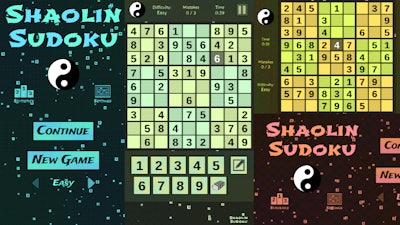
Shaolin Sudoku Gameplay

Strategy

Start with the Easy grid to lock down basic patterns. Look for “single candidates” – cells that can only hold one number. As you graduate to Medium and Hard, adopt the “candidate elimination” method: scan rows, columns, and 3×3 blocks to cross‑out impossibles. Pencil marks become your best friend; toggle them often to avoid accidental mistakes, because the game only lets you slip a few times.

Progression isn’t just about difficulty. Each completed puzzle unlocks a subtle visual upgrade—new background motifs inspired by Shaolin temples. Those upgrades keep the experience fresh and give a tangible reward for sharpening your logic.

Pro tip: when you’re stuck, pause (`` or P) and switch to “note mode”. Jot down every possible digit, then step back. The brain often spots hidden pairs or triples after a short break. Consistent practice will shave seconds off each solve, and the error‑limit timer will feel like a friendly nudge rather than a threat.

Ready to test your mental agility? Grab Shaolin Sudoku from zistop now and start carving perfection into every grid. The path to Sudoku mastery is only a tap away.

Customise Consent Preferences Close

We use cookies to help you navigate efficiently and perform certain functions. You will find detailed information about all cookies under each consent category below.

The cookies that are categorised as "Necessary" are stored on your browser as they are essential for enabling the basic functionalities of the site.

Always Active

Necessary cookies are required to enable the basic features of this site, such as providing secure log-in or adjusting your consent preferences. These cookies do not store any personally identifiable data.

Functional cookies help perform certain functionalities like sharing the content of the website on social media platforms, collecting feedback, and other third-party features.

Analytical cookies are used to understand how visitors interact with the website. These cookies help provide information on metrics such as the number of visitors, bounce rate, traffic source, etc.

Advertisement cookies are used to provide visitors with customised advertisements based on the pages you visited previously and to analyse the effectiveness of the ad campaigns.

We also use third-party cookies that help us analyse how you use this website, store your preferences, and provide the content and advertisements that are relevant to you. These cookies will only be stored in your browser with your prior consent.

You can choose to enable or disable some or all of these cookies but disabling some of them may affect your browsing experience.