


Susuke
Instructions
Controls
Use your left mouse button (or tap on your screen if you're on mobile) to draw the numbers on each boxDescription
Susuke: The Fast‑Paced Sudoku‑Style Puzzle from zistop
Why Susuke stands out
Susuke flips classic Sudoku on its head. A 3 × 3 grid, side clues, and a twist: you draw each digit right into the cell. No typing, no menus—just a swipe or click and the number appears. The result feels like a quick Flash puzzle mixed with street‑art flair. If you love brain‑busting logic but hate endless number‑crunching, this is the game that respects your time and your skill.
Mastering the controls is as simple as it gets. Use your left mouse button (or tap on your screen if you're on mobile) to draw the numbers on each box. The grid reacts instantly, turning your strokes into solid digits. Here’s the quick‑start checklist:
- Left‑click or tap a cell to activate drawing mode.
- Sketch the numeral (1‑9) you want to place.
- Release to lock the digit in place.
- Watch side clues update automatically.
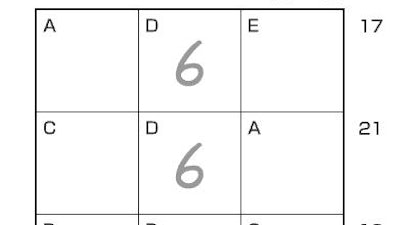
Strategy in Susuke isn’t about brute‑force; it’s about pattern recognition and the clever use of the letter‑linked cells. When two squares share a letter, they share the same number. That rule forces you to think ahead—place a 5 in one spot and instantly lock a 5 elsewhere. Top players scan the board for these mirrored letters first, then fill the easy sums before tackling the tighter rows. Progression ramps up with tighter time limits and hidden “art” challenges that reward flawless drawing speed.
Ready to put your brain to the test? Jump into Susuke now, and experience the kinetic joy of drawing numbers while solving a fresh take on Sudoku. Powered by zistop, the game delivers crisp visuals, responsive controls, and a steady stream of new puzzles. Install, play, and watch your score climb—because the only thing better than cracking a puzzle is doing it faster than the next challenger.
