Click to play
x
Controls

Controls

PC Controls

  • W / up arrow key = accelerate
  • S / down arrow key = move backward
  • A / left arrow key = turn left
  • D / right arrow key = turn right
  • Space = handbrake
  • 1 = choose to take the left upgrade
  • 2 = choose to take the right upgrade
  • 3 = choose to take both upgrades

Mobile Controls

  • Switch toggle between D / R = move forward / backward
  • Tap on the left screen = turn left
  • Tap on the right screen = turn right

(In mobile mode, the car accelerates automatically.)
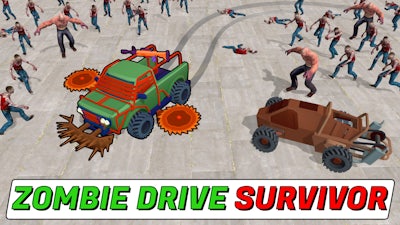
Zombie Drive Survivor

Zombie Drive Survivor

Zombie Drive Survivor
Click to play
This game is not available on mobile.
rotate phone

Zombie Drive Survivor

Instructions

Controls

PC Controls

  • W / up arrow key = accelerate
  • S / down arrow key = move backward
  • A / left arrow key = turn left
  • D / right arrow key = turn right
  • Space = handbrake
  • 1 = choose to take the left upgrade
  • 2 = choose to take the right upgrade
  • 3 = choose to take both upgrades

Mobile Controls

  • Switch toggle between D / R = move forward / backward
  • Tap on the left screen = turn left
  • Tap on the right screen = turn right

(In mobile mode, the car accelerates automatically.)

Description

Zombie Drive Survivor – Pure Horde Survival Mayhem

Crank the engine, slam the pedal, and smash through endless waves of undead. In Zombie Drive Survivor, your only weapon is a rugged car that can drift, crash, and destroy anything in its path. The 3D, top‑down view puts you right in the middle of a chaotic Zombie horde. Every kill drops experience, letting you level up, collect better gear, and stay alive longer. Miss a turn? One hit and your ride burns out. Survive the apocalypse on four wheels or watch it all go up in flames.

Mechanics

Control the beast with precision. Whether you’re on PC or mobile, the scheme is tight and responsive, letting you focus on the relentless horde.

  • PC Controls W / up arrow key = accelerate
  • S / down arrow key = move backward
  • A / left arrow key = turn left
  • D / right arrow key = turn right
  • Space = handbrake
  • 1 = choose to take the left upgrade
  • 2 = choose to take the right upgrade
  • 3 = choose to take both upgrades
  • Mobile Controls Switch toggle between D / R = move forward / backward
  • Tap on the left screen = turn left
  • Tap on the right screen = turn right (In mobile mode, the car accelerates automatically.)
Zombie Drive Survivor Gameplay

Strategy

Start by mastering drifting around tight corners. A well‑timed handbrake turn can send a pack of zombies flying, buying you precious seconds. Prioritize upgrades that boost collect rates and armor—more XP means faster access to heavy weapons like rocket launchers and flamethrowers. Keep an eye on your damage meter; a cracked windshield means a quicker crash. When the horde swells, switch to a high‑impact weapon and aim for groups to maximize killing efficiency. In Endless Mode, conserve ammo early on and unleash your most powerful gear only when the wave count spikes. Remember, every wrecked car is a chance to earn coins for a sturdier ride. Adapt your loadout to the zombie type you face—fast runners need a rapid‑fire machine gun, while tank‑like foes crumble under explosive mines.

Ready to dominate the apocalypse? Jump into the chaos, crush the undead, and prove you’re the ultimate survivor. zistop brings the adrenaline, the speed, and the nonstop action straight to your screen. Install now and start your high‑octane fight for survival.

Customise Consent Preferences Close

We use cookies to help you navigate efficiently and perform certain functions. You will find detailed information about all cookies under each consent category below.

The cookies that are categorised as "Necessary" are stored on your browser as they are essential for enabling the basic functionalities of the site.

Always Active

Necessary cookies are required to enable the basic features of this site, such as providing secure log-in or adjusting your consent preferences. These cookies do not store any personally identifiable data.

Functional cookies help perform certain functionalities like sharing the content of the website on social media platforms, collecting feedback, and other third-party features.

Analytical cookies are used to understand how visitors interact with the website. These cookies help provide information on metrics such as the number of visitors, bounce rate, traffic source, etc.

Advertisement cookies are used to provide visitors with customised advertisements based on the pages you visited previously and to analyse the effectiveness of the ad campaigns.

We also use third-party cookies that help us analyse how you use this website, store your preferences, and provide the content and advertisements that are relevant to you. These cookies will only be stored in your browser with your prior consent.

You can choose to enable or disable some or all of these cookies but disabling some of them may affect your browsing experience.